The JPEG File Format of HNCS HDR
Let’s set aside the specific implementation details of HNCS HDR for a moment and look at how Hasselblad chose the file format to store its HDR output.
The X2D II 100C is the first medium format camera to support end-to-end HDR capabilities, capable of outputting HDR HEIF or Ultra HDR JPEG photos directly in-camera.
DPReview released a sample gallery for the X2D II immediately, providing in-camera straight-out JPG and RAW downloads. According to Hasselblad, this JPG complies with the UltraHDR standard.
Let’s examine the internal details of the file:
The file contains four complete JPEG structures, with resolutions as follows:
11656x8742, 5828x4370, 3888x2918, 2592x1944.
The first and third are SDR images, while the other two are the corresponding Gainmaps. An XMP data packet, which conforms to the UltraHDR specification and features the Google Container field to identify the existence and size of the Gainmap, can be found in the APP1 segment of each JPEG structure.
Have you noticed that these resolutions are a bit strange? Gainmaps are generally full resolution or half resolution (half width and height). The Gainmap provided by Hasselblad for the full-resolution SDR image is missing one pixel on the short side, meaning the aspect ratio is not strictly the same, and the Gainmap provided for the lower-resolution SDR image has two-thirds of the original width and height, which is quite unusual.
In DPReview’s review, they wrote:
The company says this gives images with up to three additional stops of dynamic range compared to standard sRGB JPEGs, using a technique adopted by Google in its Pixel phones, and by Sigma in its BF Mirrorless camera.
This refers to UltraHDR, and the three additional stops of dynamic range likely means the X2D II specifies HDRCapacityMax = 3 in the Gainmap Metadata, providing up to 3 stops of luminance boost via the Gainmap.
In addition to the UltraHDR XMP data packet, the JPEG file also contains various data required by the ISO 21496-1 international standard Gain Map HDR format. This makes it not only compliant with the UltraHDR standard but also a future-proof international standard format, and it satisfies the requirements of UltraHDR v1.1.
Regarding the Gainmap itself, it has only one channel, meaning it is a single-channel Gainmap, which can only handle luminance mapping. This is slightly less advanced compared to the Sigma BF’s three-channel Gainmap. As for other metadata, it does not use the commonly seen 1/64 Offset but sets it directly to 0, and the Gamma is 1, which are all normal.
Concurrently, the color space of this JPEG file has changed to Display P3, which is also mentioned on their official website:
To fully present the magnificent brilliance of HDR, Hasselblad goes one step further than sRGB, expanding the color space to the broader P3.
File Format in Phocus
Hasselblad immediately updated its Phocus software for macOS and iOS, adding support for HDR editing and output.
The sample images provided on its official website, judging from the file names, appear to be processed and output by Phocus, rather than straight-out JPEGs. Indeed, after exploring the file content, this is confirmed, and they are significantly different from the straight-out JPEGs.
Firstly, they no longer contain the low-resolution images likely used for in-camera preview. There is only one SDR image and one full-resolution Gainmap. Furthermore, this Gainmap is three-channel, and the Capacity is no longer limited to three stops, reaching four stops or more.
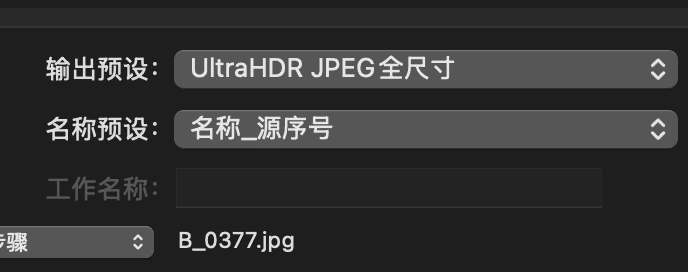
A more important difference is that this JPEG no longer features the UltraHDR structure. It doesn’t even have an XMP data packet; it’s a file with only ISO 21496-1 metadata, using MPF to identify the Gainmap location. From this perspective, the term UltraHDR used on the Phocus output panel is misleading.
Temporary Note
Such a major update in the camera industry is exciting. I wanted to share the parts I’ve already written with everyone. I will add images later and conduct further analysis if I can acquire more sample images.